
Give the visual a job
A real revision in our own WGMI content shows how a mouse scene became a visible comparison, with three checks for choosing a useful graphic.
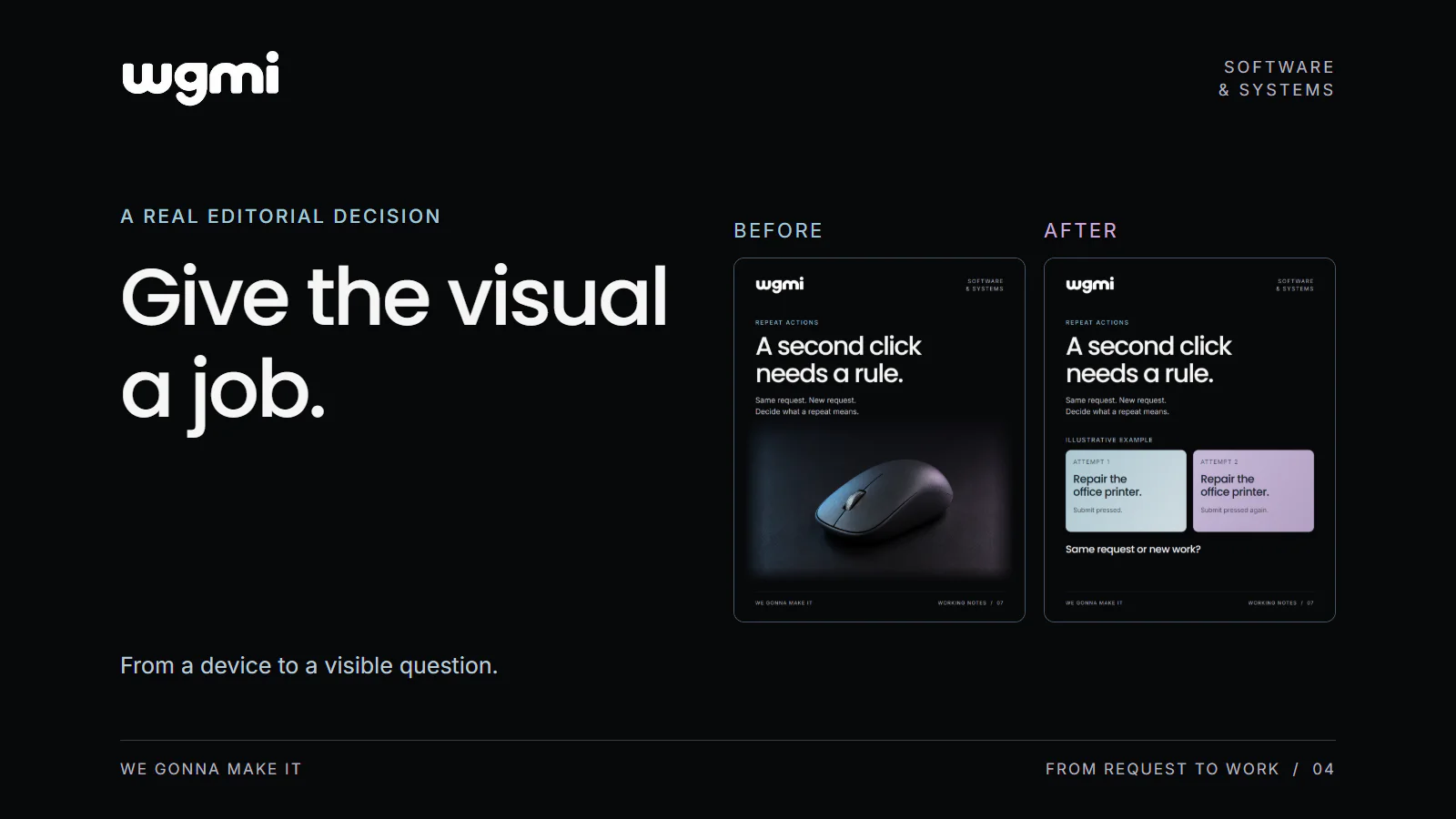
A visual can introduce the subject of a post and still leave its main question unexplained. Before choosing a picture, it helps to decide what the reader should be able to notice through it.
One revision in our own WGMI content makes that choice concrete. For the post “A second click needs a rule”, our first draft used a computer mouse. We replaced that scene with two cards showing the same request submitted twice.
The headline still asked about a second click. The new visual gave that question something specific to refer to.
Give the image one clear job
The post concerned the meaning of a repeated action. If someone submits a request again, should the system treat it as the same request or new work?
The mouse connected naturally with the word “click”. It showed the device involved in the action. What it did not show was the distinction the post wanted to discuss: two attempts, one stated intention and a question about what should happen next.
For this revision, our aim was to make the repeated intention visible. That became the job of the new composition.
This is a useful question to ask before reviewing colour, lighting or detail: what part of the idea should the image help someone understand?
Show the relationship the text is discussing
The revised design contains two cards. Both say “Repair the office printer.” One is labelled “Attempt 1”; the other is labelled “Attempt 2”. Their supporting lines distinguish pressing submit from pressing it again.
Below the pair, the question is “Same request or new work?”
The two requests are an illustrative example. They give the reader a way to examine the problem without presenting a real customer's request or a functioning product screen.
The repeated wording does a specific job. It lets someone compare the attempts while keeping the stated intention the same. The difference between the two cards concerns the repeated action.
Keep the parts that still serve the message
We kept the WGMI wordmark, dark background, white headline and blue and lavender palette. The visual relationship changed while those brand elements continued to give the post its familiar appearance.
That is a useful option when an early draft feels disconnected from the copy. You can revisit the element carrying the explanation without treating every part of the composition as a new decision.
A photograph can still be the right choice when the subject itself explains something the reader needs to see. This particular post needed a comparison between two attempts, so we chose a composition that could show that comparison directly.
Check the visual in three ways
Our suggested review has three parts: meaning, honesty and reading size.
Meaning. Write the idea the visual should explain in one sentence. Then look at the composition and identify the element that carries it. In our revised post, that element is the pair of attempts with the same request.
Honesty. Make clear what kind of material the reader is seeing. A real product screen, a proposed design and an illustrative scenario offer different kinds of evidence. The label on our revised graphic identifies the two requests as an illustrative example.
Reading size. View the graphic at the size people will encounter it. The important comparison needs to remain visible there. If a label carries the distinction, that label deserves enough space and readable type.
These checks give a review a concrete subject. Someone can point to an unclear comparison, a missing example label or a detail that disappears at the intended size.
Use the review on one graphic
Take one image you are preparing and place its caption beside it. Name the visual's job, identify the element that does that job, then check its label and reading size.
The result may be a small change, a different crop or a new composition. The decision follows from what the image needs to communicate.
Review one graphic for meaning, honesty and reading size before choosing the final version.
Prepared for WGMI with AI assistance.